
Konica Minolta bizhub
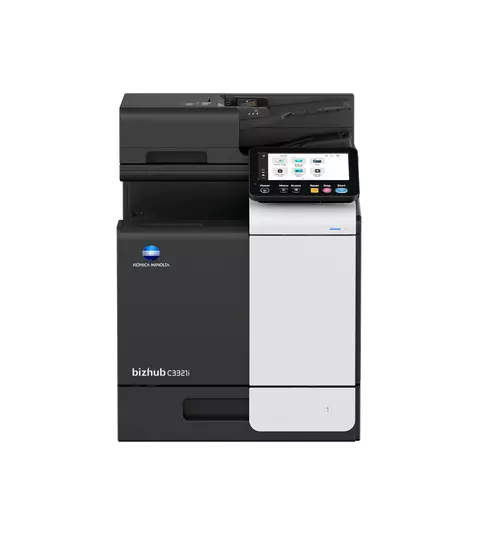
bizhub C3321i
Explore the full specifications, highlights, and brochure for this bizhub device. Use the CTA below to return to the finder or contact us for tailored recommendations.
Colour
Colour
Paper size
A4
Speed
31 - 45 ppm
Volume
30k+ pages/mo
Key highlights
Key Features
- 33/33 ppm in colour and black & white
- Paper formats: A6-A4, custom sizes
- 7-inch tablet-like colour touch panel with multi-touch support and redesigned user interface for intuitive operation and ease of use
- Reduced environmental impact thanks to state-of-the-art technology ensuring competitively low energy consumption – which saves both energy and money
- Highest data security with even greater protection against malicious activity and increased visibility of attempted cyberattacks
- Latest Technology - The new models also simplify the login process for customers using Microsoft Azure (Microsoft Entra ID) or Google Workspace and offers the opportunity to connect to their files or folders with the use of single sign-on (SSO).
- Multi-Touch Panel - Every new bizhub i-Series model has an improved and even more intuitive user interface. The function applications are now conveniently placed in the new folder “Useful apps” which is available on the home screen, but the users can group different applications based on their preferences using Drag & Drop, similar to smartphones.
- Security - A full set of security features provided by bizhub SECURE services, including Bitdefender anti-virus engine to protect your organization from malware infection.
- With the new “Authentication Attack Detection” function, it is now possible to block unauthorised attempts deriving from brute force attacks, a method commonly used by cyber criminals to crack passwords and other access data, to infiltrate devices from outside. In the event of such an attempt, the IT admin is informed and can take appropriate action
- Sustainability - Energy-saving settings, low TEC values, space-saving design and award-winning air packaging helps to reduce environmental impact and save costs at the same time.
Functionalities
- Copy: Blank Page Removal - Automatic deletion of blank pages e.g. when copying mixed simplex and duplex documents
- Copy: New User Interface - Light, simple and modern UI is easy to use
- Copy: Quick Access To Settings - With most used settings visible at first sight, select them with one click, drop down or pop up menu
- Fax: Fax Forwarding - Forwarding of incoming fax documents by email or to SMB folder instead of printing
- Fax: IP-Fax - Sending of fax messages via network between Konica Minolta MFPs
- Fax: IP-Fax - supports colour as well as black & white
- Fax: PC-Fax - Direct fax transmission from the PC
- Fax: Shared Address Book - The MFP-internal address book can be shared with the PC fax client
- Fax: Tray Selection - Choice of input tray / print media and output tray for easy visibility of incoming faxes
- Finishing: Finishing - Offline corner stapling, duplex
Specifications
- Copier Specifications: Copy resolution - 600 x 600 dpi
- Copier Specifications: Gradation - 256 gradations
- Copier Specifications: Multicopy - 1-9,999
- Copier Specifications: Original format - Max. A4
- Copier Specifications: Magnification - 25-400% in 0.1% steps
- Copier Specifications: Magnification - Auto-zooming
- Printer Specifications: Print resolution - 1,800 (equivalent) x 600 dpi
- Printer Specifications: Print resolution - 1200 x 1200 dpi
- Printer Specifications: Page description language - PCL 6 (XL3.0)
- Printer Specifications: Page description language - PCL 5c
Brochures & downloads
Download the latest Konica Minolta datasheets for deeper technical specifications.
Gallery
Explore the full printer gallery.